Food delivery apps have exploded in popularity in the last few years, and DoorDash is one of the biggest delivery apps in the market.
But when you place an order on DoorDash, you might notice that getting food delivered to your door isn’t exactly cheap. Between delivery fees, service fees, and driver tips, the costs can add up! DoorDash is an expensive service, but there are ways to save.
In this article, learn why your DoorDash order costs as much as it does and how you can save on your next order.
What you need to know
- Merchants set prices: DoorDash does not add markup
- The delivery fee ranges between $1.99–$4.99, but can be higher during busy times
- The service fee is around 15%
- The DashPass membership can help you save on delivery fees and service fees
Article Contents
- How Much Does a DoorDash Delivery Cost?
- DoorDash Promos: How to Save
- How Do DoorDash Drivers Get Paid?

How much does a DoorDash delivery cost?
The cost of a DoorDash order is the sum of food costs, taxes, a delivery fee, and a service fee.
You can easily see how much a DoorDash order will cost by downloading the DoorDash app and entering an order. You will see the exact breakdown of your order cost on the checkout page.
Cost of a DoorDash order = Food cost + tax + delivery fee + service fee + tip (optional)

Every cost & fee on DoorDash, straight from the source
Retail deliveries on DoorDash use the same pricing system. You pay for the cost of the items, taxes, a delivery fee, and the service fee.
Does DoorDash add markup to restaurant & item prices?
Merchants on DoorDash set their own prices. DoorDash does not add markup to restaurant prices.
If prices are higher in the DoorDash app, the restaurant or store chose to list higher prices. DoorDash does not guarantee that prices inside the app are the same as prices in a restaurant.
Merchants may list higher prices in the DoorDash app to make up for service fees that DoorDash charges.
The DoorDash delivery fee: $1.99–$4.99
DoorDash charges a delivery fee that typically ranges from $1.99–$4.99. Delivery fees may increase when it’s busy, which will be indicated in the app with an icon and message saying that delivery fees are increased due to high demand.
In the app, delivery fees are listed underneath the restaurant’s name as you browse, on the restaurant’s page, and on the order checkout page.
You can pay less for delivery fees by searching for restaurants offering free or discounted delivery.
You can also eliminate delivery fees by signing up for DashPass, a monthly subscription. DashPass members don’t pay any delivery fees for orders $12 or more.
The delivery fee is not paid directly to Dashers. Instead, Dashers are paid according to a formula that is not directly connected to the delivery fee. More on Dasher pay below.
The DoorDash service fee: 15%
The service fee on DoorDash is typically around 15%, with a minimum fee of $4. The service fee percentage can vary depending on your order size, location and nearby market demand.
DashPass subscribers pay less service fees—typically only 5% per order.
To see the exact service fee for your order, go to the checkout page and find the line item “Fees and estimated tax.”
Tap the small “i” button next to “Fees and estimated tax” to see a breakdown of fees and taxes.
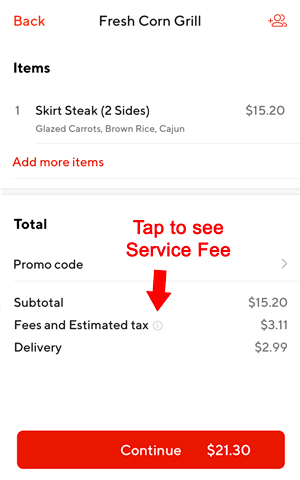
Enter an order and visit the checkout page to see the total cost. Don’t forget to tip!
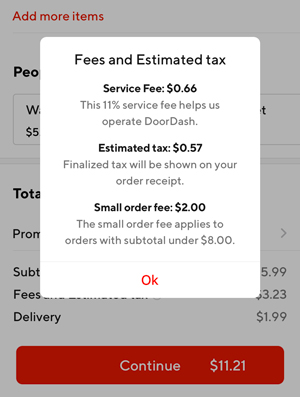
Increase your order size The small order fee
Other fees on DoorDash
The Express delivery fee is a $1.99–$2.99 fee to decrease delivery times. When your Dasher picks up multiple orders, the Express delivery fee can put your order at the front of the line.
The small order fee is a fee of approximately $2 that is added to orders that don’t reach a minimum subtotal, usually around $10–$12. The minimum subtotal varies city to city. Avoid the small order fee by adding extra items to your order.
The long range fee is an additional fee for orders outside the typical delivery range for a restaurant.
Other fees can include regulatory and government fees, like bag & bottle fees or state-mandated driver benefit fees. For example, New York City has the NYC Regulatory fee that adds a $1.99 fee to every order in response to a minimum earnings law.

Some cities have additional fees, like the NYC Regulatory Response Fee
How to save on DoorDash orders
There are several ways you can save on your next DoorDash order.
DoorDash promo codes for new users
It’s more difficult for existing users to get credits. You can refer friends to the app and receive credit when they sign up, wait for other promotions by DoorDash, or try to find online promo codes for existing users.
Below is an example of a promo code for existing users, but it expired within 2 weeks. Keep an eye out for notifications and emails to see other offers for existing users.

Keep an eye out for promos that work for existing users
DashPass: Get $0 delivery fees and reduced service fees
DashPass is a monthly membership that offers $0 delivery fees and reduced service fees on all orders $12 or more.
DashPass will pay for itself if you consistently use DoorDash more than a few times each month.
DashPass for Chase card members
DoorDash has a partnership with Chase credit cards that offers DashPass benefits when you use an eligible Chase credit card as your default payment method.
For example, Chase Freedom users can get DashPass benefits for 3 months after adding a Chase Freedom card to their DoorDash account. Other Chase cards may offer different benefits. See more details here: DashPass for Chase cardmembers.

Add a Chase card to see the DashPass offer
“Offers for you:” Discounts, free delivery, and other promos
Restaurants regular offer free delivery, discounts on your order, and other temporary promotions. Check the “Offers for You” section on the home screen to see a list of active offers.
You might see promos like 20% off up to $5 or $0 delivery fee. You can filter for delivery fee offers or discount offers.

Find ‘Offers for You’ on the home screen
Do delivery fees go to DoorDash drivers?
The delivery fee paid by customers is not paid directly to Dashers. Instead, Dashers are paid according to a formula: Base pay + Promotions + Tips.
Base pay is $2–$10, typically closer to $2 than $10. Tips and promotions are where they earn most, but most cities don’t have enough demand to offer frequent promotions.
Tips make up a significant portion of Dasher income. You can tip electronically in the app or tip cash in person.
Dashers typically earn around $8 per delivery, but order payout can be even lower.
Dashers are free to accept or decline any order that comes their way, and can decline orders that appear to have a low payout.
Learn more about delivering with DoorDash
Should you tip your DoorDash driver?
You should always tip your DoorDash driver unless the Dasher was seriously unprofessional or incompetent.
Why? Base pay for Dashers is quite low, sometimes as low as $2.
That means that without a tip, Dashers earn very little. Customers can leave a tip inside the app before or after ordering, and tipping in cash is allowed.
Another reason to tip when you place your order is that it can help guarantee faster delivery.
Under the current DoorDash pay model, Dashers see an estimated order payout that includes the tip before they accept the order.
If there is no tip on your order, the estimated payout will be low and Dashers may decline your order. That means longer wait times for you.
More DoorDash Tips
Ace says
Very informative article, especially for a Dasher who never orders through the app as a customer. Useful to see what they do. However, as a update, the quality of the offers a Dasher gets drops substantially if we decline more than 30% of the last 100 given. DoorDash is pushy.
Myrna says
Thank you! This was VERY informative and even answered a couple of questions that I didn’t know that I had!
Judith L Robbins says
What would be the cost of picking up a Grocery order and delivering to a home close by the store (Martin’s food store in DuBois Pa)
DougH says
Best way to get an estimate is to download the app and input the order. Or do it online at door dash.com