Most Lyft rides go by without a problem, but what are your options when you need Lyft customer service to step in and fix an issue?
You may have left something behind in the car, overpaid for your ride, or perhaps you want to report a complaint about your driver.
The fastest way to contact Lyft customer service is to use the Help section at the bottom of every ride receipt to report an issue. Reporting the issue will begin a live chat thread with Lyft customer service, where you can get further assistance with your problem.
Looking for a customer service phone number? There isn’t one! Unless you have a serious safety incident to report, you can’t talk to a live human on the phone.
Read on for step-by-step instructions and more tips to get real help from Lyft!
The best ways to contact Lyft
- In the Lyft app main menu, use Ride History and Help to report ride issue and start a live chat with customer service — Every ride receipt has a section to report a lost item, dispute a charge or a fee, report a complaint about a driver, and many other common issues
- To chat with customer service: Use ride receipts to report an issue. A live chat with customer service will begin after you report some issues
- Find a a Contact Us button in Help section topics to start a chat — Useful if you have a general question not related to a recent ride
- You can’t call Lyft! There isn’t a Lyft support phone number for routine issues. The only public phone numbers are reserved for serious safety incidents
- Go to help.lyft.com — Recent rides are listed at the top of the page. Helpful for reporting common ride issues
- Contact Lyft on X — Send a direct message (DM) to the Lyft support X account
- For Lyft drivers: How to contact driver support
Article Contents
- You Can’t Call Lyft!
- Get Help inside the Lyft App
- Chat with Customer Service
- Get help at help.lyft.com
- Contact Lyft on X (Twitter)
- How to Recover a Lost Item from a Lyft

You can’t call Lyft! There is no direct Lyft support phone number
There is no customer service phone number that Lyft users can call.. You can’t directly reach a human on the phone unless it’s about a serious safety incident!
The only publicly available phone number at Lyft.com is for the service animal hotline, (844-554-1297), but that phone line is reserved for service animal issues.
You can request a phone call from the Lyft critical response team about a safety issue, and it is possible to call them directly. However, the critical response team is reserved for serious safety incidents. You should not use it for common complaints.
An old Lyft support number floating around the internet (844-313-3667) only plays a recorded message telling you to go to the Help section of the Lyft app or help.lyft.com.
In addition, you can’t directly email Lyft. There isn’t a customer service email address.
To contact Lyft or get help with a problem, you can start a live chat with support representatives or send a message to support and wait for a reply. Instructions below!
How to chat with Lyft customer service
The Lyft app offers several ways to contact customer service and start a live chat with support agents.
In the Help and Ride History sections of the app, you can dispute a charge, report a driver, change your payment method, etc. After you select an option, a live chat with customer service will begin.
Another way to message support and start a live chat is by finding a Contact us at the bottom of some pages in the Help section of the app.
Use ride receipts to report a problem and start a live chat
In the main menu, find Ride History, then select a ride. Scroll to the Help section and select Get help with another issue, then pick the best-matching problem. After you report an issue, a live chat with Lyft support reps will begin.

Use the Help section of ride receipts to report issues and start a chat with Lyft support
Find a Contact Us button in Help articles to chat with support or send a message
You can also start a chat session with Lyft support by finding the Contact Us button at the bottom of many help articles in the Help section. Tap Contact Us, then select Message as your preferred contact method. That will begin a live chat.
But there isn’t a Contact Us button in every Help article. You may need to scroll through several Help pages before you find the button.
One reliable way to start a live chat is by going to Help > Profile and account > Can’t request a ride

Find a Contact Us button and select the Message option to start a live chat with Lyft

Live chat with Lyft by reporting an issue, or by finding a Contact Us button in a Help article
To find your current and past chat sessions, Go to the Help section of the app and tap the inbox icon in the upper right corner.

To find previous chat threads go to Help, then tap the inbox icon in the upper corner
Report a serious safety incident
In the Lyft app, go to Help then scroll to Report a safety issue to report a serious incident. Alternatively, you can visit this page at Lyft.com. Serious incidents could include vehicle collisions or unsafe and inappropriate behavior by your driver.
How to get a refund on a ride
Follow these steps to request a refund or fare review from Lyft:
- Tap the Menu icon (☰) on the home screen
- Tap Ride History
- Find the ride and tap it
- Scroll to the bottom of the ride receipt and tap Get Help
- Select Dispute ride fare or charge to request a refund
Getting a full refund from Lyft is unusual unless something went very wrong with the ride, like a major issue with your driver or an accident. Instead of a full refund, Lyft typically offers a reduced fare or a ride credit for future rides.
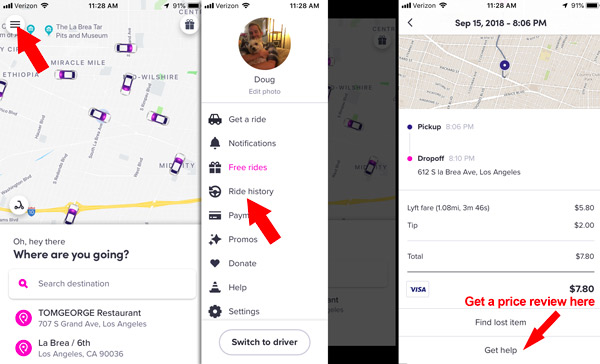
Dispute a fare in the Ride History section
How to report a complaint about a Lyft driver
To report your driver for unsafe driving or other unprofessional behavior, find your ride receipt in the Ride History section of the app then scroll to the bottom of the receipt to find the Help section.
Tap Get help with another issue > Submit feedback on driver
You can also report an unsafe car condition, an accident, or any other general complaint about a driver.

Report a complaint about your driver in the ride receipt
How to contact Lyft customer service at help.lyft.com
The customer support options available in the Lyft app are also available at help.lyft.com. You can view your ride history, report issues, chat with support, and browse customer support articles.
Going to help.lyft.com is the best option if you lose your phone and need to contact Lyft.
There is also an extensive library of support articles that will answer most general questions, and many also have a Contact Us button at the end of the article that can put you in touch with support agents.

Log in at help.lyft.com to get help with recent rides
Browse through the list of articles or use the search feature to find a help page. Scroll to the bottom of a help page to find the Contact Us button.
After you click Contact Us, follow steps to select your issue and select I still need help to get options to contact Lyft.

Most pages at help.lyft.com have a Contact Us button

Find the “I still need help” button, then fill out the contact form
Contact Lyft on X (Twitter): @AskLyft
Lyft has an X account—@AskLyft—dedicated to passenger and driver support. Send a direct message (DM) about your issue and wait for a support representative to follow up.
Typically, the customer support rep will ask for more information about your Lyft account and then instruct you to wait for further help.
The next updates will come via email and in-app messages.
How to recover a lost item from a Lyft
If you lost something during a Lyft ride, Lyft may be able to connect you with your driver to coordinate a time and a place to get your item back.
But remember that neither Lyft nor your driver are responsible for lost items. Most drivers will try to help you get your item back, but they are not obligated to help you.
You can contact your driver if it has been less than 24 hours since your ride
Go to the Ride History section of the app, tap the ride where you lost the item, then scroll to the Find a lost item option. You will see an option to call or message your driver using a masked phone number to keep your personal details private.
From there, it’s up to you and the driver to coordinate a meeting time and place. If your driver doesn’t respond, you can try calling or messaging them again, but ultimately they are not responsible for lost items and you may be out of luck if they never respond.
If more than 24 hours have passed since your ride…
Go to the Ride History section of the app, find the ride, scroll down and select I lost an item. Input your info and describe the item. Lyft will send a message to the driver asking if they have your item, and from there, it’s up to the driver to contact you to work out a time and a place to meet.
What if your driver doesn’t respond about your lost item?
If you can’t reach your driver or they don’t respond to your messages, contact Lyft customer support for more help. Lyft support agents can send a message to the driver, but there is nothing they can do to force the driver to respond to you.
Lost your phone in a Lyft? How to contact your driver without your phone
Go to help.lyft.com on a computer or a friend’s phone. Find the ride receipt for the ride where you lost the items and scroll to Get Help. Select the lost item option.
Input your info and use a friend or family member’s phone number. Lyft will send a message to your driver asking if they have your item, and from there, it’s up to the driver to contact your friend or family member to work out a time and a place to meet.
The lost item fee: $20 when a driver returns your item
Lyft charges a $20 returned item fee if your driver successfully returns your item. 100% of the fee goes to the driver.
Here’s what drivers see when they return your lost item:

Drivers can charge you $15 for returning a lost item
The best ways to get real help from Lyft customer service
- Start by using the Help features in ride receipts. You can solve most issues with pre-made forms
- Give all the relevant details that Lyft asks for
- Keep your message brief
- Try sending a tweet to Lyft at @AskLyft if you aren’t getting anywhere in the app
More help for Lyft users
Denise Selby says
Im trying to find out why my credit card is being declined by your company. I am physically challenged and need to use your service to get home at night. Please help me figure out what to do. I talked to my bank and can’t find anything wrong with my card.
DougH says
Hello. This isn’t the Lyft website, it’s ridesharingdriver.com. Try to enter another card if possible. If not, enter it again or have someone you trust help you enter it. If that doesn’t work, you’ll have to go to help.lyft.com and scroll to the contact form to get help. You could also try Uber.
Raymond says
So I keep having people call me to sign up but I try to and I got denied because my license was suspended. DMV made a mistake. I try to reapply but the app will not let me. I drive for Uber now but like to drive for Lyft so what do I need to do now
DougH says
If it’s a DMV mistake, contact [email protected] and the DMV to see how you can have that removed from your record. Once it’s removed, Lyft may allow you to reapply.
Bruce says
I discovered 6 charges from Lyft on my credit card and have never used the service, not only do I want a refund I would also like to see where this person was picked up and dropped off, is that possible?
DougH says
You’ll be able to get a refund but you won’t be able to get any info about the person who committed the fraud.
Jessi says
I ordered a Lyft and no price was visible. Earlier from my hotel it said $28.63 so not a problem for the price. Now I have a bill of $138.11 how does this even Happen?!?!
DougH says
Sounds like the price jumped way up to to Prime Time pricing. You may be able to get some of it refunded if you contact Lyft. Try to be calm and polite even though it’s a frustrating situation.
Thoko S Xaba says
How can I turn off lyft line I do not want to drive more than 1 passenger at a time when I do lyft line it’s annoying as hell and the pay is abysmal
DougH says
You can ignore those requests, or use Mystro, and Android app, to filter out Line requests.
Valerie Renee Toney says
I today I ordered a Lyft cab I was just out of McDonald’s picking up my food I went out to tell the driver that I was coming I was just waiting on them to give me my pop when I walked away from the door he pulled off and I was charged for that
DougH says
Lyft drivers only have to wait 2 minutes at the pickup spot before they can cancel the ride and charge you a cancellation fee. Try to be ready to go out to the car as soon as it arrives.
Rhonda McGriff says
Link to the lost and found sucks cannot contact without my phone