Most Lyft rides go by without a problem, but what are your options when you need Lyft customer service to step in and fix an issue?
You may have left something behind in the car, overpaid for your ride, or perhaps you want to report a complaint about your driver.
The fastest way to contact Lyft customer service is to use the Help section at the bottom of every ride receipt to report an issue. Reporting the issue will begin a live chat thread with Lyft customer service, where you can get further assistance with your problem.
Looking for a customer service phone number? There isn’t one! Unless you have a serious safety incident to report, you can’t talk to a live human on the phone.
Read on for step-by-step instructions and more tips to get real help from Lyft!
The best ways to contact Lyft
- In the Lyft app main menu, use Ride History and Help to report ride issue and start a live chat with customer service — Every ride receipt has a section to report a lost item, dispute a charge or a fee, report a complaint about a driver, and many other common issues
- To chat with customer service: Use ride receipts to report an issue. A live chat with customer service will begin after you report some issues
- Find a a Contact Us button in Help section topics to start a chat — Useful if you have a general question not related to a recent ride
- You can’t call Lyft! There isn’t a Lyft support phone number for routine issues. The only public phone numbers are reserved for serious safety incidents
- Go to help.lyft.com — Recent rides are listed at the top of the page. Helpful for reporting common ride issues
- Contact Lyft on X — Send a direct message (DM) to the Lyft support X account
- For Lyft drivers: How to contact driver support
Article Contents
- You Can’t Call Lyft!
- Get Help inside the Lyft App
- Chat with Customer Service
- Get help at help.lyft.com
- Contact Lyft on X (Twitter)
- How to Recover a Lost Item from a Lyft

You can’t call Lyft! There is no direct Lyft support phone number
There is no customer service phone number that Lyft users can call.. You can’t directly reach a human on the phone unless it’s about a serious safety incident!
The only publicly available phone number at Lyft.com is for the service animal hotline, (844-554-1297), but that phone line is reserved for service animal issues.
You can request a phone call from the Lyft critical response team about a safety issue, and it is possible to call them directly. However, the critical response team is reserved for serious safety incidents. You should not use it for common complaints.
An old Lyft support number floating around the internet (844-313-3667) only plays a recorded message telling you to go to the Help section of the Lyft app or help.lyft.com.
In addition, you can’t directly email Lyft. There isn’t a customer service email address.
To contact Lyft or get help with a problem, you can start a live chat with support representatives or send a message to support and wait for a reply. Instructions below!
How to chat with Lyft customer service
The Lyft app offers several ways to contact customer service and start a live chat with support agents.
In the Help and Ride History sections of the app, you can dispute a charge, report a driver, change your payment method, etc. After you select an option, a live chat with customer service will begin.
Another way to message support and start a live chat is by finding a Contact us at the bottom of some pages in the Help section of the app.
Use ride receipts to report a problem and start a live chat
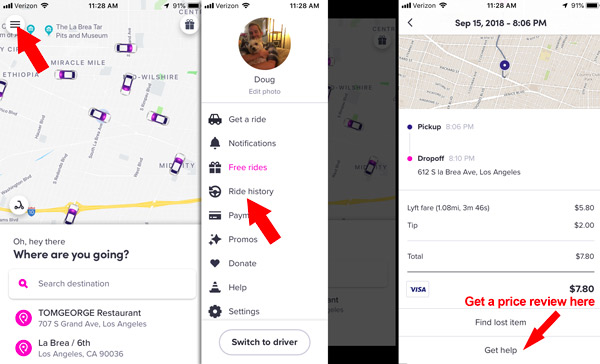
In the main menu, find Ride History, then select a ride. Scroll to the Help section and select Get help with another issue, then pick the best-matching problem. After you report an issue, a live chat with Lyft support reps will begin.

Use the Help section of ride receipts to report issues and start a chat with Lyft support
Find a Contact Us button in Help articles to chat with support or send a message
You can also start a chat session with Lyft support by finding the Contact Us button at the bottom of many help articles in the Help section. Tap Contact Us, then select Message as your preferred contact method. That will begin a live chat.
But there isn’t a Contact Us button in every Help article. You may need to scroll through several Help pages before you find the button.
One reliable way to start a live chat is by going to Help > Profile and account > Can’t request a ride

Find a Contact Us button and select the Message option to start a live chat with Lyft

Live chat with Lyft by reporting an issue, or by finding a Contact Us button in a Help article
To find your current and past chat sessions, Go to the Help section of the app and tap the inbox icon in the upper right corner.

To find previous chat threads go to Help, then tap the inbox icon in the upper corner
Report a serious safety incident
In the Lyft app, go to Help then scroll to Report a safety issue to report a serious incident. Alternatively, you can visit this page at Lyft.com. Serious incidents could include vehicle collisions or unsafe and inappropriate behavior by your driver.
How to get a refund on a ride
Follow these steps to request a refund or fare review from Lyft:
- Tap the Menu icon (☰) on the home screen
- Tap Ride History
- Find the ride and tap it
- Scroll to the bottom of the ride receipt and tap Get Help
- Select Dispute ride fare or charge to request a refund
Getting a full refund from Lyft is unusual unless something went very wrong with the ride, like a major issue with your driver or an accident. Instead of a full refund, Lyft typically offers a reduced fare or a ride credit for future rides.
Dispute a fare in the Ride History section
How to report a complaint about a Lyft driver
To report your driver for unsafe driving or other unprofessional behavior, find your ride receipt in the Ride History section of the app then scroll to the bottom of the receipt to find the Help section.
Tap Get help with another issue > Submit feedback on driver
You can also report an unsafe car condition, an accident, or any other general complaint about a driver.

Report a complaint about your driver in the ride receipt
How to contact Lyft customer service at help.lyft.com
The customer support options available in the Lyft app are also available at help.lyft.com. You can view your ride history, report issues, chat with support, and browse customer support articles.
Going to help.lyft.com is the best option if you lose your phone and need to contact Lyft.
There is also an extensive library of support articles that will answer most general questions, and many also have a Contact Us button at the end of the article that can put you in touch with support agents.

Log in at help.lyft.com to get help with recent rides
Browse through the list of articles or use the search feature to find a help page. Scroll to the bottom of a help page to find the Contact Us button.
After you click Contact Us, follow steps to select your issue and select I still need help to get options to contact Lyft.

Most pages at help.lyft.com have a Contact Us button

Find the “I still need help” button, then fill out the contact form
Contact Lyft on X (Twitter): @AskLyft
Lyft has an X account—@AskLyft—dedicated to passenger and driver support. Send a direct message (DM) about your issue and wait for a support representative to follow up.
Typically, the customer support rep will ask for more information about your Lyft account and then instruct you to wait for further help.
The next updates will come via email and in-app messages.
How to recover a lost item from a Lyft
If you lost something during a Lyft ride, Lyft may be able to connect you with your driver to coordinate a time and a place to get your item back.
But remember that neither Lyft nor your driver are responsible for lost items. Most drivers will try to help you get your item back, but they are not obligated to help you.
You can contact your driver if it has been less than 24 hours since your ride
Go to the Ride History section of the app, tap the ride where you lost the item, then scroll to the Find a lost item option. You will see an option to call or message your driver using a masked phone number to keep your personal details private.
From there, it’s up to you and the driver to coordinate a meeting time and place. If your driver doesn’t respond, you can try calling or messaging them again, but ultimately they are not responsible for lost items and you may be out of luck if they never respond.
If more than 24 hours have passed since your ride…
Go to the Ride History section of the app, find the ride, scroll down and select I lost an item. Input your info and describe the item. Lyft will send a message to the driver asking if they have your item, and from there, it’s up to the driver to contact you to work out a time and a place to meet.
What if your driver doesn’t respond about your lost item?
If you can’t reach your driver or they don’t respond to your messages, contact Lyft customer support for more help. Lyft support agents can send a message to the driver, but there is nothing they can do to force the driver to respond to you.
Lost your phone in a Lyft? How to contact your driver without your phone
Go to help.lyft.com on a computer or a friend’s phone. Find the ride receipt for the ride where you lost the items and scroll to Get Help. Select the lost item option.
Input your info and use a friend or family member’s phone number. Lyft will send a message to your driver asking if they have your item, and from there, it’s up to the driver to contact your friend or family member to work out a time and a place to meet.
The lost item fee: $20 when a driver returns your item
Lyft charges a $20 returned item fee if your driver successfully returns your item. 100% of the fee goes to the driver.
Here’s what drivers see when they return your lost item:

Drivers can charge you $15 for returning a lost item
The best ways to get real help from Lyft customer service
- Start by using the Help features in ride receipts. You can solve most issues with pre-made forms
- Give all the relevant details that Lyft asks for
- Keep your message brief
- Try sending a tweet to Lyft at @AskLyft if you aren’t getting anywhere in the app
More help for Lyft users
Nicole Burton says
I have been a Lyft customer for years, and I am so sick and tired of you having drivers that have absolutely no clue where they are going even with a navigation system, so they are really late in picking me up even after I have a pre advanced set pick up time. It makes me not want to use Lyft anymore. Get your act together Lyft.
YOGI says
my comment as a driver, i have to to endure all kind of conversation from riders , that i do not wish to hear either. so what do you do about that? Man people is people , your purpose is to get from point A to B, safely. All that extra stuffd , driver dont talk , this and that , Drivers is not a entertainment hub. riders complains about drivers on the phone , talking thru their speakers in car, talking about it is a safety issue. well talking to you ,( the Rider )is a distraction too. yall act like drivers is not humans or have any rights in tgheir own vehicle , it like the Riders and Lyft owns your vehicle. All people needs to focus on getting to where you need to go. Cab drivers does not have to ENDURE ALL OF THIS COMPLAING AND RATING STUFF , TO RIDESHARE.
DougH says
You could try to kill conversations by giving boring answers.
Daany says
Had a Lyft driver pick us up at a friends home, the iPhone X I was using to request ride was left behide in the car. I called the phone two min later to see if she would pick up instead she said she didn’t have it mind me I live in Bristol ri, five mins later phone is tracked on rt 24 mass
Then twenty min later in a Cumberland farms parking lot in Fall River ma . I tried to contact Lyft driver she gave me a bad attitude. Then I tracked my phone to a huge garbage bin behide Cumberland farms ! This is a $1000 phone and I wasn’t about to jump in a dumpster in Fallriver ma riddled with needles and god knows what else I very disappointed in some people they have no morals now I’m really afraid of ride share u just never know who’s behide the wheel . These people don’t care about what’s left behide check twice before leaving the car not everyone has the same heart as u.
Bridget Tokach says
My husband and I have been loyal customers for some time. This past weekend, we were picked up in an unsafe vehicle. When we brought it to our driver’s attention, she filed damages for a broken seatbelt that we showed her was broken when she picked us up. She is blaming us, and we were charged $210. This is a complete scam! Unfortunately, it is our word against hers, and no one cares to here our side of the story.
The customer service rep who replied to us is not very helpful, not answering any of our questions. Maybe someone here could help?
DougH says
Typically Lyft tends to side with the customer in situations like these. You should continue to message Lyft and emphasize that you didn’t cause the damage. If you have a record of being a highly-rated passenger, there’s a good chance they will eliminate or reduce the fine.
Wallis says
I am going to being to say something is wrong with Lyft service, This is the third time in three months this has happened, I have the app so I request share ride ,Then they find driver my ride is on the way ,My phone signal that my ride is here ,I am standing at the address I give and the ride and driver is a no show I call the driver where’s are you and the is gone ,how you gone when you didn’t turn up .And then this company go in and take $6 whenever that happen charge me for a no show driver. Now Lyft please tell me how must I pay you for a ride I didn’t get .I don’t know what kind a scam
Dr. Angela Carlton says
I had a bad experience today in a Lyft that I was taking with one of my students. For context, I am a 30 year old woman and my student is 19. We both mentioned our ages as our driver was very talkative and inquisitive about us. He proceeded to talk about women offensively, including saying that “black women don’t crack” as they age that he was surprised any man had married his daughter even after she’d paid 5000 dollars for a dating service as she was so unpleasant, that my student and I should both have children, that we only had a limited time slot in order to have kids. He said you had to stay young looking in order to find a good man. At this point I said that I was gay; he suggested that I freeze my eggs and referred to my 19 year old student as my girlfriend. My student and I then felt very uncomfortable as I explained she was a student of mine. The whole ride was very uncomfortable and awkward. I gave him a high rating and a three dollar tip because as a woman I sometimes feel like I have to endure this kind of behavior, that it’s expected, but on reflection and after talking it over with others, I think this was entirely inappropriate and I want Lyft to do something to ensure this doesn’t happen to others. I also expect to be fully refunded for my journey.
DougH says
Sorry to hear about your bad experience. You’re well within your rights to complain about this driver and expect some type of refund or compensation. Most likely, you’ll get a ride credit. In the future, don’t be afraid to give a low rating and to not tip. Your driver will not be able to retaliate in any meaningful way. You don’t need to rate or tip right away, so you can wait until you are away from the vehicle to do so. Even if they somehow connect a drop in ratings to your ride, the worst they can do is give you a low rating.
Stacy says
Almost every third ride it’s with unpleasant experience. Or the driver mixed up the pickup spot with the drop off spot, and when he saw the mistake didn’t cancel immediately, i waited 20 minutes. Today the first driver left, waiting for 15 minutes, the second driver also didn’t know the road, and after 15 minutes cancel the ride. Please check who you hire. It was a driver also who didn’t speak English at all…to bad for your company that you hire everyone without any requirements…