Uber offers many different payment methods to pay for your ride or Uber Eats order, and there are several easy ways to add and switch between payment options.
You can even change your payment method after a ride is over!
Read on to see how to add different payment options, and how to use Uber Cash, and what to do if you run into problems.
Uber & Uber Eats accept these payment methods
- Credit and debit cards
- Bank account with Link
- Paypal
- Venmo
- Apple Pay
- Google Pay
- Klarna
- Gift card
- Uber Cash
- CVS Pharmacy
- S3 Health Benefits Card
Zelle is not currently a payment option on Uber.
Uber does not accept cash (in the United States)
You can’t pay for an Uber ride in cash in the US, but you can tip your driver with cash. Cash on delivery (COD) is also not available for Uber Eats deliveries.
You must have an active payment method in your Uber Wallet to request a ride, and it will automatically be charged after the ride is complete.
Uber has an in-app credit system called Uber Cash, but it is not the same as paying in cash.

Plenty of ways to pay
Related: How much does Uber cost? Uber fare estimator
How to add a payment method to your Uber account
You can add a payment method to your Uber Wallet in your account settings, or you can add a payment method when you request a ride or place an Uber Eats order.
To add a payment option to your Uber Wallet, tap Account in the lower right corner of the home screen, then tap Wallet.
Scroll to ‘Add payment method‘ and select the Payment Method you want to add. Follow the on-screen instructions to add your payment method.

Go to Account > Wallet to add a payment option
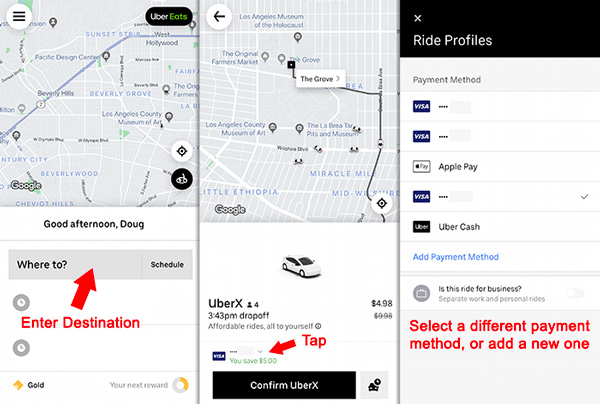
To add a payment method when you request a ride: Enter your destination, then tap on the payment method icon near the bottom of the screen. You can change the payment method, or add a new one.
How to select a different credit card or payment option
You can select a payment method before you request an Uber, and you can change you payment method during a trip.
To change your payment method before you request a ride:
- Enter your destination
- Tap the credit card icon at the bottom of the screen
- Select a different payment option or enter a new one
How to use a bank account to pay for Uber
Through a partnership with Link, you can now directly link your bank account with your Uber profile to pay for rides and deliveries. In your Wallet, tap Add payment method and find the Bank account option.
After you follow steps to link your bank account, you will be able to pay for Uber directly from your bank account.
Pay with Apple Pay or Google Pay
You can pay for Uber and Uber Eats with Apple Pay and Google Pay.
If Apple Pay or Google Pay are already set up on your phone, go to your Wallet to enable it as a payment method.
In your Wallet, tap Apple Pay or Google Pay to link to your Uber account. After that, you’ll be able to select Apply Pay or Google Pay from your list of payment methods.
How to change the payment method for a past trip
If you used the wrong payment method for a past trip, it is possible to change the payment method if the trip is less than 30 days old.
Go to Activity at the bottom of the Uber app and find the trip. Tap Receipt, then scroll to find ‘Switch payment method.‘ Select your preferred payment type.
You can follow the same steps at help.uber.com or in the email receipt that you receive for each trip.

Go to the ride receipt to change the payment method for a past trip
What is Uber Cash?
Uber Cash is Uber credits that you can use to pay for rides or Uber Eats orders. You can purchase Uber Cash in the Uber app, or you can be rewarded Uber cash from special promotions or refunds.
Gift card balances appear as Uber Cash, credits offered by Uber support appear as Uber Cash, and some other promotional credits also appear as Uber Cash.
To use Uber Cash to pay for a ride, select it as a payment method before you request the ride or place an order.
How to get Uber Cash
- Purchase it: Buy Uber Cash inside the app
- Earn it as a credit card reward: Some credit cards (such as the Amex Platinum Card) offer Uber Cash as a reward
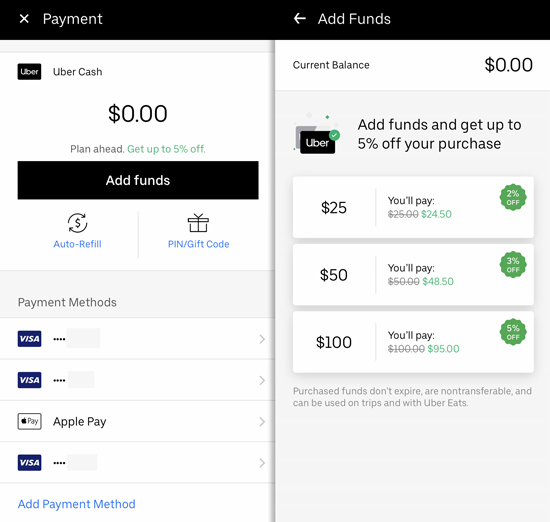
Load your account with Uber Cash to get a small discount
Uber promo codes: Another way to get Uber discounts
Uber offers promo codes for new users that give a discount on rides. To add a promo code, head to Account > Wallet, then scroll to “Add Promo Code.” Enter the code there.
My code: Use promo code cws7s2 to get a discount. It works for all new users in the USA.
Promotions from Uber promo codes are automatically applied to rides. You can’t prevent a promo code promotion from applying to a ride. Promo codes are applied in reverse order, meaning your most recently added code will be applied to your next trip.
What to do if you can’t add a credit card to your Uber account
Some users follow steps to add a new payment method only to find that the card doesn’t become available in the list of payment options.
If that happens, restart the app and repeat the process. If that doesn’t work, you will need to contact Uber customer service.
How to delete a credit card or payment option from your account
To delete a credit card or other payment method, tap Account > Wallet.
Tap the payment method you want to delete, then tap Remove payment method.
What to do when you can’t delete a payment method
When you get a new credit card, you might want to delete an old one before you add the new one.
You may see this error message: “You must have at least one payment method active.” To prevent that error, add in your new card first before you delete the old one. It may take a day or two for the old card to disappear.
You can update a credit card expiration date without deleting and re adding the card. Go to Payment, select the card, then tap the icon in the upper right to edit the card info.
Another problem Uber users run into is when a deleted payment method still show up as a payment option. You can ignore the old card, but make sure to select your current card when you request a ride to prevent errors.
If fully deleting the card from your account is important to you and you’re unable to do it yourself, contact Uber.
Can more than one Uber account use the same credit card?
Uber may not allow you to add or select a credit card that is already in use by another account. Some users see this error message, “This payment method is being shared by too many uber accounts.”
Uber examines credit card and phone number usage to prevent fraud. If a credit card is connected to too many accounts, it can trigger fraud detection systems.
If you’re sharing the credit card with a family member, consider creating a Family Profile to ensure that you can share the card.
More Uber Tips
Mike says
Anyone have the issue of not being able to link a third cc to their account? I’ve been trying to add my AMEX and it keeps saying “failed” what’s worse, each time this happens, my Amex is being charged 1.50. Any advice?
DougH says
Very frustrating. All I can suggest is trying another card. Sadly this issue will have to be solved by Uber’s slow email support. Try [email protected]
doug h says
Uber asks for a 3 digit CVC code on the back of the card, but amex actually uses a 4 digit code on the front of the card. Try using the 4 digit code on the front. I tried this and the uber app added my amex card with no problem.
Christine says
OMG thank you. I’ve been trying to add my AMEX for an hour with the code on the back. Front code was the trick.
Cathy Christensen says
I had to replace my debit card that I used for Uber. I have tried the Add Payment screen with my new debit card information , and now that information is stuck on the screen with Adding Credit Card and a circle to its left going in circles, and nothing is happening, its like its stuck. Please tell me how to fix this
DougH says
There are a few things you can try. First, close the app and end the process. You may have to google how to do that. If that doesn’t work, delete the app and redownload it. If that doesn’t work, you’ll have to email Uber and have them sort it out.
Sean S says
Hi, I’ve relocated from Sydney to London, and I’m trying to update my card payment within the Uber app. Have tried numerous times on multiple devices, but receive a failed message. Why? Help please.
DougH says
Very frustrating, and sadly the only way you’ll sort this out is by emailing Uber. My passenger account was plagued with issues like this until recently, and I never figured out exactly why. Eventually after enough emails Uber pressed a magic button and suddenly my payment options were accepted.
Rosemin Stevens says
The app doesn’t allow me to pay by cash, add another card or select Paytm. I’m currently in Columbus OH and my details are registered in India. However I can’t just pay with any option that you have
DougH says
That sounds frustrating. Have you tried Paypal, google wallet, or any of the other options listed? You’ll have to email Uber support to get this figured out, sadly.
Jason says
There is no option to change credit card and when I do the add payment option is grayed out. Now I have to resort to these shitty cab companies whos drivers try to rip u off. Not happy right now
DougH says
Try deleting and re-adding the payment option. If that doesn’t work, take a screen cap and email Uber.
Doug says
I changed my credit card due to fraud. I want to update this new credit info. My account is now disbled and I can’t sign in
Sandra Zebaze says
I deleted my credit card from my uber account and I would like my trip to be charged to the new debit card I added. But every time I try to charge my trip to that card it fails. Help.