Uber offers many different payment methods to pay for your ride or Uber Eats order, and there are several easy ways to add and switch between payment options.
You can even change your payment method after a ride is over!
Read on to see how to add different payment options, and how to use Uber Cash, and what to do if you run into problems.
Uber & Uber Eats accept these payment methods
- Credit and debit cards
- Bank account with Link
- Paypal
- Venmo
- Apple Pay
- Google Pay
- Klarna
- Gift card
- Uber Cash
- CVS Pharmacy
- S3 Health Benefits Card
Zelle is not currently a payment option on Uber.
Uber does not accept cash (in the United States)
You can’t pay for an Uber ride in cash in the US, but you can tip your driver with cash. Cash on delivery (COD) is also not available for Uber Eats deliveries.
You must have an active payment method in your Uber Wallet to request a ride, and it will automatically be charged after the ride is complete.
Uber has an in-app credit system called Uber Cash, but it is not the same as paying in cash.

Plenty of ways to pay
Related: How much does Uber cost? Uber fare estimator
How to add a payment method to your Uber account
You can add a payment method to your Uber Wallet in your account settings, or you can add a payment method when you request a ride or place an Uber Eats order.
To add a payment option to your Uber Wallet, tap Account in the lower right corner of the home screen, then tap Wallet.
Scroll to ‘Add payment method‘ and select the Payment Method you want to add. Follow the on-screen instructions to add your payment method.

Go to Account > Wallet to add a payment option
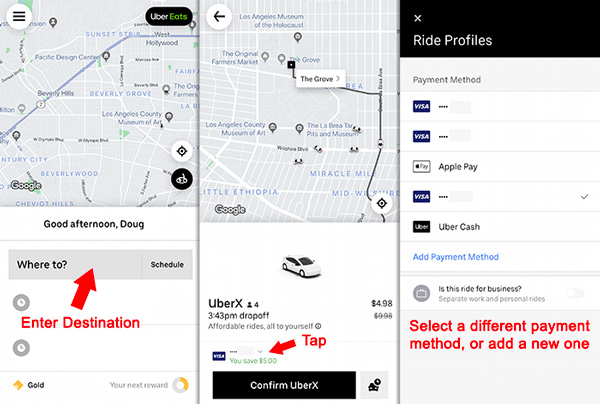
To add a payment method when you request a ride: Enter your destination, then tap on the payment method icon near the bottom of the screen. You can change the payment method, or add a new one.
How to select a different credit card or payment option
You can select a payment method before you request an Uber, and you can change you payment method during a trip.
To change your payment method before you request a ride:
- Enter your destination
- Tap the credit card icon at the bottom of the screen
- Select a different payment option or enter a new one
How to use a bank account to pay for Uber
Through a partnership with Link, you can now directly link your bank account with your Uber profile to pay for rides and deliveries. In your Wallet, tap Add payment method and find the Bank account option.
After you follow steps to link your bank account, you will be able to pay for Uber directly from your bank account.
Pay with Apple Pay or Google Pay
You can pay for Uber and Uber Eats with Apple Pay and Google Pay.
If Apple Pay or Google Pay are already set up on your phone, go to your Wallet to enable it as a payment method.
In your Wallet, tap Apple Pay or Google Pay to link to your Uber account. After that, you’ll be able to select Apply Pay or Google Pay from your list of payment methods.
How to change the payment method for a past trip
If you used the wrong payment method for a past trip, it is possible to change the payment method if the trip is less than 30 days old.
Go to Activity at the bottom of the Uber app and find the trip. Tap Receipt, then scroll to find ‘Switch payment method.‘ Select your preferred payment type.
You can follow the same steps at help.uber.com or in the email receipt that you receive for each trip.

Go to the ride receipt to change the payment method for a past trip
What is Uber Cash?
Uber Cash is Uber credits that you can use to pay for rides or Uber Eats orders. You can purchase Uber Cash in the Uber app, or you can be rewarded Uber cash from special promotions or refunds.
Gift card balances appear as Uber Cash, credits offered by Uber support appear as Uber Cash, and some other promotional credits also appear as Uber Cash.
To use Uber Cash to pay for a ride, select it as a payment method before you request the ride or place an order.
How to get Uber Cash
- Purchase it: Buy Uber Cash inside the app
- Earn it as a credit card reward: Some credit cards (such as the Amex Platinum Card) offer Uber Cash as a reward
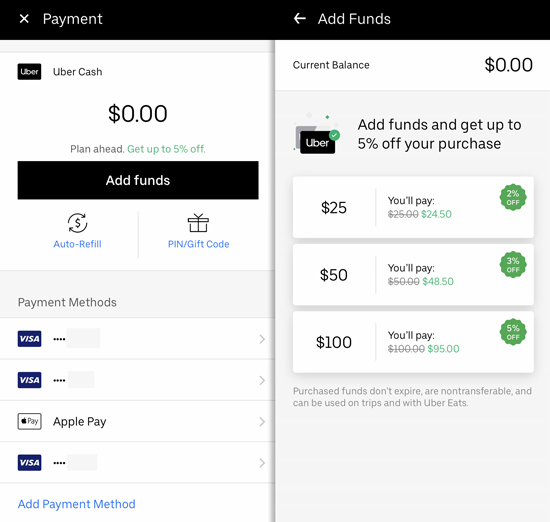
Load your account with Uber Cash to get a small discount
Uber promo codes: Another way to get Uber discounts
Uber offers promo codes for new users that give a discount on rides. To add a promo code, head to Account > Wallet, then scroll to “Add Promo Code.” Enter the code there.
My code: Use promo code cws7s2 to get a discount. It works for all new users in the USA.
Promotions from Uber promo codes are automatically applied to rides. You can’t prevent a promo code promotion from applying to a ride. Promo codes are applied in reverse order, meaning your most recently added code will be applied to your next trip.
What to do if you can’t add a credit card to your Uber account
Some users follow steps to add a new payment method only to find that the card doesn’t become available in the list of payment options.
If that happens, restart the app and repeat the process. If that doesn’t work, you will need to contact Uber customer service.
How to delete a credit card or payment option from your account
To delete a credit card or other payment method, tap Account > Wallet.
Tap the payment method you want to delete, then tap Remove payment method.
What to do when you can’t delete a payment method
When you get a new credit card, you might want to delete an old one before you add the new one.
You may see this error message: “You must have at least one payment method active.” To prevent that error, add in your new card first before you delete the old one. It may take a day or two for the old card to disappear.
You can update a credit card expiration date without deleting and re adding the card. Go to Payment, select the card, then tap the icon in the upper right to edit the card info.
Another problem Uber users run into is when a deleted payment method still show up as a payment option. You can ignore the old card, but make sure to select your current card when you request a ride to prevent errors.
If fully deleting the card from your account is important to you and you’re unable to do it yourself, contact Uber.
Can more than one Uber account use the same credit card?
Uber may not allow you to add or select a credit card that is already in use by another account. Some users see this error message, “This payment method is being shared by too many uber accounts.”
Uber examines credit card and phone number usage to prevent fraud. If a credit card is connected to too many accounts, it can trigger fraud detection systems.
If you’re sharing the credit card with a family member, consider creating a Family Profile to ensure that you can share the card.
More Uber Tips
Craig says
What about when Uber sees to it that the app is broken and adding a payment method is just a blank.screen?
DougH says
Frustrating! Try to delete and re-install the app. If that doesn’t work, you’ll have to contact Uber
Sarah S says
I have $5 left in uber credit but I can never use it because my rides always cost more than that, is there a way to do part uber credit and the rest credit card?
DougH says
A $5 credit is like a $5 coupon. It will be applied to the cost of one ride. So if the ride is more than $5, you’ll get $5 off. If the ride is less than $5, it will be free and you won’t keep any unused ‘balance’
Lara says
I’m having trouble clearing an outstanding balance on my account. I’ve tried everything it says to do but when I click on “Pay Now” nothing happens. I called my bank to check my account and everything is fine on their end. I don’t want Uber contacting me about not paying because I’m trying. I really want to delete Uber at this point but I can’t even do that without paying this balance that it won’t allow me to pay. Can I please speak to a human? I
DougH says
Unfortunately with a glitch/software error like this you’ll have to figure it out via Uber support. Here’s my post on ways to contact Uber customer service. You may not be able to use phone support
Frankie says
You can also user Google pay and money connected to your Play Store account. If you use apple then you may have not see that option on your phone as Apple doesn’t allow Play store credit. Just felt like I should point that out. It’s very convenient for people who don’t have credit cards what’s whatever reason don’t want to link their account up to their bank or whatever.
Lisa Merito says
I need to label/name my credit cards. Right now it lists Visa #### and Visa ### and amex ### but i need them labeled. Example: Lisa’s personal and Corporate Travel and Boss’s personal and Lisa Business. I have 7 different cards and i can’t remember the last four digits to each one. I need to label them. please and thank you.
DougH says
You can create a business profile and set a default card for personal or business profiles, but for now I don’t believe there is a way to label cards
Karen Busch says
I need help adding a n actual credit card that’s valid. It won’t let me add it because there’s no menu to even allow me to do that
DougH says
Make sure your app is updated, and make sure you’re signed in. Then tap the menu icon in the upper corner, then Payment, then find the “Add Payment Method” link. It should be there
Harold Cineus says
I want to change my credit account.the system doesn’t give me chance . I don’t use the credit they have on file anymore
Aaaaa says
Nobody is stuck because they don’t know how the navigate the main menu. People are stuck on the login, where they cannot change the default card and there is no menu. Or the app has an error or glitch that can’t be resolved.
Typical **** worthless web page.
DougH says
If you’re unable to log in at all, go to help.uber.com and find the help article “I can’t sign in”