Delivering for Uber Eats has quickly become one of the most popular delivery gigs.
Uber Eats delivery drivers enjoy the flexibility of working without a schedule and the freedom to accept or decline any order request.
The easy requirements to apply also make Uber Eats an attractive option: You can use just about any vehicle, and you only have to be 19 or older.
If you’ve ever thought about delivering for Uber Eats, here is a complete guide to applying, getting started, and doing your first deliveries.
What you need to know about delivering for Uber Eats
- Uber Eats drivers pick up & deliver orders from local restaurants & stores
- Uber Eats drivers are paid per delivery and earn around $15–$20 per hour
- Drivers must be 19 years or older
- Bicycle riders can be 18 or older
- Any vehicle model year qualifies
- Some cities require 20 years old or newer
- You can also do Uber ridesharing rides if your vehicle qualifies
Deliver with Uber Eats! Click here to apply
Article Contents:
- What do Uber Eats delivery drivers do?
- Uber Eats driver requirements
- How much do Uber Eats drivers make?
- What it’s like to deliver for Uber Eats
- Is Uber Eats worth your time?

What do Uber Eats delivery drivers do?
In simple terms, Uber Eats delivery drivers pick up and deliver orders from local restaurants and stores.
Most orders on Uber Eats are for restaurant delivery, but Uber Eats customers can also order from convenience stores, grocery stores, and other retailers.
Uber Eats drivers start delivering by signing into the Uber Driver app and waiting for order requests.
When a request comes in, you’ll see the estimated payout, restaurant name, customer location, and overall mileage. You are free to accept or decline any order request.
Most Uber Eats drivers use a vehicle to do deliveries, but some deliver on bicycles or scooters.
How to sign up for Uber Eats: The application process
- Apply online or in the Uber driver app
- If you plan to drive, upload your driver’s license and other vehicle info
- Consent to a background screening
- Wait to hear if Uber accepts your application. Typically takes 3–10 days
- When you are accepted, sign into the Uber driver app and start taking delivery requests
Uber Eats Delivery Driver Requirements
- You must be 19 years old or older (21 years old in Canada)
- Bicycle couriers must be 18 years or older
- You must have a driver’s license, insurance, and proof of vehicle registration
- Have access to a 2-door or 4-door vehicle
- Bicycle and scooter delivery is available in some cities
- Must be able to lift up to 30 pounds
Already an Uber driver? How to opt into Uber Eats deliveries
If you’re already an Uber driver, you can opt into eats deliveries in the “Work Hub” of the Uber Driver app.
In the Uber Driver app: Tap Menu > Account > Work Hub, and select “deliver food with Uber Eats. From there, tap “Turn on deliveries.”

Turn on deliveries in the Work Hub, found in Account
How to turn on Uber Eats delivery requests in the app
You can enable or disable deliveries if you are eligible to do Uber rides and Uber Eats deliveries.
To turn delivery requests on or off: On the bottom of the home screen, tap on the icon with two lines to bring up your Driving Preferences. Then tap on Deliveries to enable or disable the option and tap Save.
You will get ride and delivery requests if you enable both at the same time.
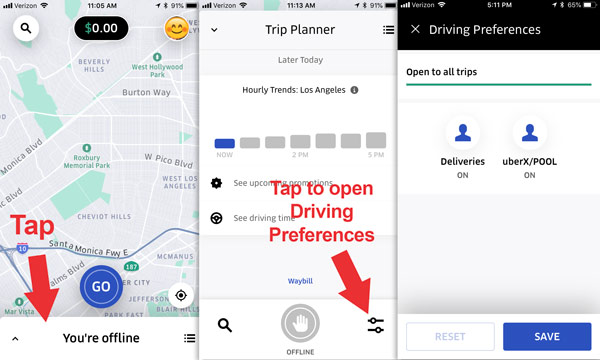
Turn delivery requests on or off by changing your Driving Preferences
How Uber Eats drivers can switch to rideshare
If you began as an Uber Eats driver and want to give rides for Uber’s ridesharing services, you have to contact Uber and ask to add rideshare to your driver profile.
Currently, there is no direct way to make the switch to rideshare. You have to contact Uber.
How much do Uber Eats drivers make?
According to the top employment data sources online, Uber Eats drivers can expect to make around $15–$20 per hour.
Drivers are paid per delivery, so your actual pay depends on the deliveries you do, the days and times you work, and the local conditions in your market.
Tips from customers make up a large percentage of your pay on Uber Eats. The most profitable drivers learn to accept delivery requests that are likely to include a tip.
Pay for Uber Eats deliveries is generally lower than the pay for Uber rideshare drivers, which is closer to $15–$25 per hour after accounting for expenses.
The tradeoff is that ridesharing drivers tend to put more miles on their cars and have the added stress of dealing with passengers inside their car.
How Uber Eats delivery drivers get paid: Earnings calculation for each delivery
Uber Eats delivery drivers are paid for each completed delivery.
Order requests pop up in the driver app and show an estimated payout, the restaurant or store location, the customer’s location, and the estimated mileage to complete the delivery.
The payout for each delivery is based on this equation: Base fare + trip supplement + promotions + tips.
Uber does not share how they calculate base fare, but the upfront information will typically give you enough information to tell you if the order is worth your time.
- Base fare: Pay for pickup, drop-off, time, and distance
- Trip supplement: Added to base fare to account for extra time, distance, demand
- Promotions: Boost, Quest, and surge earnings (Read more below)
- Tips: Drivers keep 100% of tips. Customers can tip in the app before or after an order
Uber Eats payout = Base fare + trip supplement + promotions + tips

A sample payout: Base fare, trip supplement, and a tip
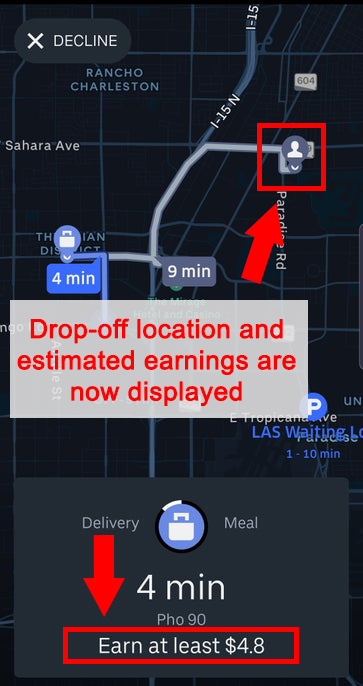
The new pay model shows estimated earnings and the customer’s drop-off location
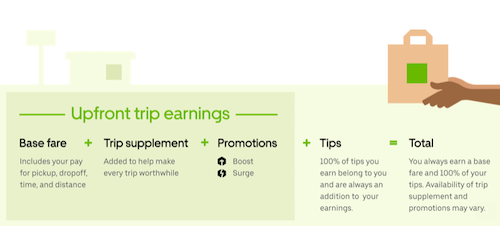
Uber’s graphic explaining the current pay model
How drivers get paid: Weekly direct deposits or cash out with Instant Pay
Uber Eats earnings are paid every Thursday via direct deposit.
You can also cash out your earnings up to 5 times daily with the Instant Pay feature. Each Instant Pay withdrawal costs $1.25.
Sign up for the Uber Pro debit card to get free Instant Pay withdrawals. Your earnings are automatically transferred to the card after each delivery, and you can get other perks like cash back on gas.
How tips work for Uber Eats drivers
The Uber Eats app allows customers to tip delivery drivers, and drivers keep 100% of tips.
Customers can leave a tip when they place their order or after the order is complete.
Uber Eats includes some tipping info in the upfront payout estimate, but not necessarily all of it.
Selecting orders with tips is the best way to maximize your income. You’ll know a customer didn’t tip when the up-front estimate is low. And most drivers report that tipping after the delivery is rare.
“Includes expected tip” and tip baiting
The order request screen may say “Includes expected tip” beneath the estimated payout. That means the estimate you see includes some or all of the tips the customer left during checkout.
If a customer doesn’t tip in the app, the estimated payout will be low, and you’ll know the order might not be worth it.
One issue: Customers can change their tip after receiving the order (aka tip baiting). If your customer changes the tip, your final payout won’t match the expected payout you saw on the request screen.
The Uber Plus card: Pre-paid card for shop & pay orders
Uber Eats drivers don’t have to handle payments for most orders. But for orders that Uber can’t pay for in advance, drivers can opt in to use the Uber Plus card.
The Uber Plus card is pre-loaded with funds. Drivers use it to pay for “shop & pay” orders during pickup.
On a shop and pay order, you visit a store to pick out items from a list, then pay for the order and deliver it to the customer.
You have to opt-in to receive a Plus card. Request the card by going to Account > Plus card.
After receiving the Plus card in the mail, you will be eligible to receive order requests that require the card.
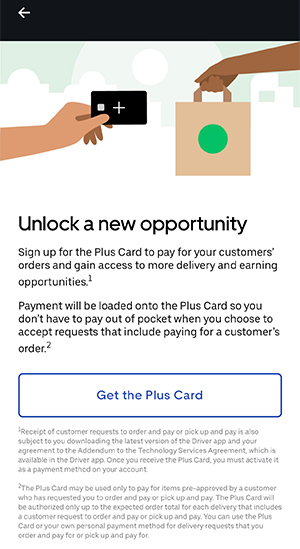
Drivers in eligible markets will see a Plus Card opt-in
Once you have the Plus card, you can opt out of shop & pay orders in the preferences area of the Uber driver app.

Opt out of shop & pay in the preferences area of the driver app
Driver bonuses: Boost, Quest, Surge, and more
Uber offers several earnings promotions for Eats drivers that can increase your earnings.
To see the current bonuses in your area, go to Menu > Opportunities in the driver app.
Quest: Bonus for completing deliveries. For example, “Earn $8 extra by completing four trips between 5 and 9 pm.”
Boost: Earnings multiplier. For example, you might see an offer for 1.7x Boost in a specific downtown area of your city during the lunch rush. The map on the home screen will show the Boost zone, the earnings multiplier, and the times when the multiplier is available.
Surge: Dynamic earnings multiplier that appears during times of high demand. The difference from Boost is that surge is applied dynamically, while Boosts are pre-set and scheduled in the app.
Streaks: Bonus for completing consecutive deliveries. Example of a streak: “Complete five deliveries in a row between 5 pm and 9 pm for $10 cash”
Guaranteed earnings: Get a guaranteed minimum payout for completing deliveries. If your earnings don’t meet the guaranteed minimum, you receive a bonus payment to make up the difference.
For example, “Earn at least $2350 for completing 210 trips within your 30 first days back.” If you complete 210 trips and only earn $2250 (not including tips), you’ll get a $100 bonus to meet the minimum guarantee.

Quest: Complete the required number of deliveries to get your bonus

Streaks: Accept and complete consecutive deliveries

Guaranteed earnings: Get a bonus if your ride/delivery earnings don’t meet the minimum
Delivering for Uber Eats: Step-by-step process
Order requests appear in the Uber driver app as a popup notification that shows the estimated payout, the restaurant name & location, the customer’s location, and the estimated total mileage for the delivery.
Picking up an order
After you tap to accept the order, navigate to the restaurant using the in-app GPS instructions (You can select a different navigation app in your app settings).
Once you arrive at the restaurant, check the order screen to see the order’s contents, the customer’s name, and the order number. Give that information to store employees and pick up the order when it is ready.
Once you have the delivery, tap to confirm that you picked up the order and swipe “Start delivery” to move on to the next step.
Dropping off an order
Once you arrive at the customer’s destination, look at the customer notes to see if you deliver to their door or drop it off for a no-contact delivery.
Customers can choose from these drop-off options
- Leave at door: Customers can request that drivers drop off the delivery at their door without an in-person handoff. (More about no-contact deliveries)
- Hand it to me: Meet the customer at their address. If it’s not apparent where the customer will be located based on the pin, call or text them to ask if they have a preferred meeting spot.
- Curbside drop-off: The customer comes to you. The customer will receive a text that tells them to meet you at the curb after you arrive.
Tap the ‘Delivered’ button inside the app once you’ve completed the delivery, and follow on-screen instructions to rate the experience and complete the order.
Cancellations and no shows
If a customer cancels the order after you’ve picked it up, you will still receive full payment for the order. The app will tell you to dispose of the order, but some drivers choose to keep the items.

You will still be paid if the customer cancels an order after you pick it up
If you arrive at the delivery location but can’t find a way to access the customer’s door, you can cancel the order after waiting 8 minutes and still get paid for the delivery.
The customer might not have provided a gate code or the entryway could be blocked for some other reason. In that case, tap Help and begin the 8 minute timer to collect your pay.
Other delivery types
Most orders on Uber Eats are for restaurant or retail pickups, but there are a few other order types that you may encounter.
Shop & pay — Go to grocery stores and drugstores to pick out items, then pay for the order with the Uber Plus card. Similar to shopping for Instacart.
Walmart — Visit Walmart stores to pick up & deliver orders.
How to contact Uber Eats support for drivers
Delivery drivers have a few ways to get help from Uber support.
During an order, there is a contact button that will put you in touch with Uber Eats driver support, and there are also buttons to contact the restaurant and the customer.
- If you have an issue picking up the order: Contact the restaurant. Contact info is available inside the Uber driver app
- If you picked up the order but can’t complete it: Contact Uber support
- If you’re having trouble dropping off the order: Contact the customer using the contact button inside the app
- If you can’t reach the customer: Contact Uber support or begin the cancellation process
- Support number for Uber Eats drivers: 1-800-253-9435
Is delivering for Uber Eats worth it?
Generally speaking, Uber Eats is a good part-time gig that can give you a flexible side income.
Because the vehicle requirements are so lenient, just about anyone with a car will qualify.
You can deliver on a bicycle or scooter in many cities, so there’s no significant up-front investment.
You can drive whenever and wherever you want without worrying about scheduling shifts or dealing with a boss. That’s a great benefit if you need flexible work right now.
The earnings are around $15–$20 per hour on average, but can vary a lot from day to day or week to week.
Benefits of delivering for Uber Eats
- You can drive for Eats at 19, or 18 if you use a bicycle
- Easy vehicle requirements. Almost any model year qualifies
- You don’t have to deal with passengers
- Flexible work: Work whenever you want; no need to schedule hours
Drawbacks of delivering for Uber Eats
- The pay can be low. It can dip beneath $10/hour if your area isn’t busy
- Common work frustrations that can grind you down: Long waits at restaurants, traffic, parking, trouble contacting the customer or finding where exactly to deliver the food
Uber Eats is worth a try if you’re looking for flexible work.
Other delivery gig options: DoorDash, Instacart, Shipt, Amazon Flex
If you’re interested in driving for Uber Eats, consider other on-demand delivery gigs. Most have easy driver requirements and offer similar pay as Uber Eats.
Janne says
I am very interested in working for uber eats however I have not been a driver for a year. I am a new driver who has only been driving for a few months now. So my question is will I still be able to work for uber eats?
DougH says
You need a license for one full year.
Mike says
So we go to restaurants to pick up all the food orders then?
DougH says
Yes. You get a notification when the food is close to ready, then you head to the restaurant and pick up the order. Then you navigate to the customer.
D. says
This needs to be corrected. I’m currently an UberEats driver in San Antonio TX. Uber is talking 50% of our earnings. Customers rarely tip…but to those of you that do, thank you so much for the extra you give. It’s much needed and very much appreciated.. You guys rock!! I don’t even think I make minimum wage. They also don’t have a guaranteed pay rate. On a large number of deliveries I earn 2 to 3 dollars. You don’t get paid for mileage to the pickup location. Only from pick up to drop off. Now that they have partnered with McDonalds, a lot of times I’m driving 4 to 5 miles to pick up, only to go 1/2 mile down the road therefore, only get paid for that 1/2 mile of mileage for the delivery. This is because there’s a McDonald’s on every 3 blocks. After the 20 to 30 dollars in gas I put daily with the increased gas prices, my car payment and my car insurance payment, not to mention oil changes, tires ETC, all I can afford is a pack of cigs, sometimes a scratch off, a candy bar, and on a good day a Frappuccino and a scone… Fortunately, I stay with family, otherwise I’d be homeless because no way would I even get close to being able to pay any rent off my earnings… But for all the wonderful benifits Uber provides its drivers, they so deserve to take a 50% service fee (Said with sarcasm) And before I start getting all the negative replies telling me if I don’t like it then stop doing it, I start with another delivery service tomorrow. So please keep the negative feedback to yourself. I just wanted to to let anyone thinking about delivering for Uber know what it’s really like … And it’s not what they claim.. Just trying to help prevent someone else from being robbed by Uber.
Hemi says
Thank you for sharing your experience!
Bryan says
Hi I would like to try, sounds interesting just to make a little here and there specially when it’s on your way :). I live downtown Montréal and i have a brand new scooter. Is a scooter (moped) ok? Or you absolutely need to have a car? Thanks
DougH says
I checked Uber’s page for Montreal and they mention bikes but not scooters. So I’m not 100% sure, but I think it’s likely that you can.
Dennis says
What is the process for picking up the food? Do I go inside? Am I given a name?
DougH says
You are given a name. You go inside and say something to the workers like “UberEATS for *name*”
Michelle says
Does the car you use have to be in your name (registered to you)? My boyfriend and I are sharing s car right now. We live together and I’m on his car insurance but the car is not in my name. It’s in his name.
DougH says
You can use his car as long as you’re on the insurance. It doesn’t matter who is on the registration, but you will need to provide a photo of the registration when you add the vehicle to your account.
Philip says
You said each city has “service boundaries”, what exactly does that mean? Will I have to take orders from people who are further away from me than I would like?
DougH says
Yes, it is possible that customers will be further than you would like. Check uber.com/cities and find your city to see what the boundaries are. It’s pretty uncommon to get a request very, very far beyond what you’d normally want to do.